Can a Headshot Be a Selfie?
Can a headshot be a selfie? Learn when it works, why it often doesn’t, and how AI headshots create fast, realistic alternatives that look truly professional.

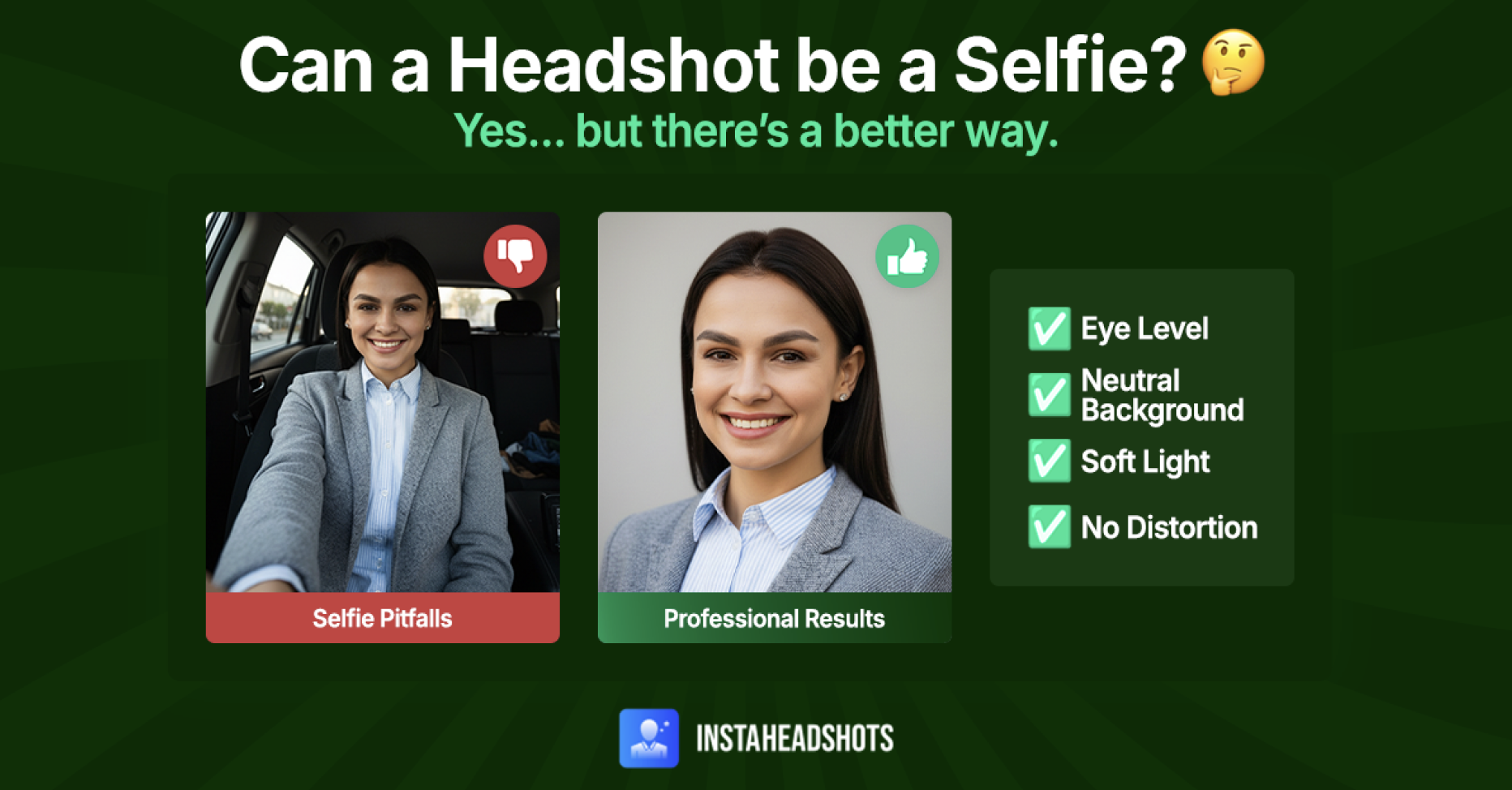
When a selfie works as a headshot—and when you should choose an alternative.
You need a new headshot fast. Maybe a job posting went live, a conference asked for a bio photo, or your LinkedIn profile hasn’t been updated in years. There’s no time to book a professional photographer, and with today’s phone cameras offering high resolution, a quick selfie feels like the obvious solution.
But the real concern isn’t speed—it’s your first impression.
While a selfie can technically function as a headshot, most fall short. Phone lenses introduce distortion, lighting is rarely intentional, and casual framing can make even highly capable professionals look ill-prepared or inconsistent. In situations where you need to appear confident, credible, and polished, those details matter.
AI headshots offer a faster, more reliable alternative. While many tools prioritize speed over realism, InstaHeadshots is designed to create headshots that look like you, not like AI. The entire process takes about 15 minutes and doesn’t require a studio or camera setup.
TL;DR: A selfie may seem like the fastest way to get a headshot, but distortion, uneven lighting, and casual framing often undermine credibility. Since headshots appear across LinkedIn, company sites, and other high-visibility contexts, image quality plays a meaningful role in perception. When time is limited, a realistic AI-generated headshot offers a faster, more dependable option than booking a photographer.
Can a selfie work as a headshot?
In certain situations, a selfie can work as a headshot. With the right camera settings, balanced lighting, and clean framing, it may be acceptable in some professional settings.
In practice, though, most selfies fall short and don’t show you at your best. A headshot is often the first place potential employers or clients encounter you, and a casual or uneven image can quietly erode your personal brand.
Many selfies are taken quickly, which leads to unflattering angles or harsh shadows that pull focus away from your face. In a pinch, people may even resort to cropping an old group photo, resulting in an image that feels improvised rather than considered. These details make viewers work harder to interpret your expression and competence.
Fortunately, better options are now easy to access. High-resolution smartphone cameras can provide a solid starting point, and when paired with a professional AI tool like InstaHeadshots, a simple photo can be transformed into a polished headshot with minimal effort.
Why selfies usually fall short (and when they might be acceptable)
Even with modern smartphones, it’s difficult to achieve the level of refinement expected of a business headshot. Here’s why selfies often miss the mark in professional settings:
- Distortion: Phone lenses behave differently from traditional cameras. Features closest to the lens appear slightly enlarged, subtly altering face shape and proportions.
- Lighting: Replicating professional lighting in everyday environments is challenging. A selfie taken in a dim apartment or from the driver’s seat often creates harsh shadows under the eyes or flattens skin tone, both of which detract from a professional look.
- Framing: Holding a phone at arm’s length makes balanced, symmetrical framing hard to accomplish. Many selfies are taken from overhead or low angles, which can feel awkward or closed off rather than confident and approachable.
- Backgrounds: Busy offices, cars, or street scenes introduce visual noise around your face. While portrait mode can soften distractions, it doesn’t always produce a clean result.
That said, selfies aren’t inherently unprofessional. When a selfie doesn’t work, it’s usually because of distortion, uneven lighting, or unrefined composition—not because the format is unacceptable.
There are situations where a selfie may be an acceptable option for a professional headshot:
- Urgent requests: If the deadline for a job application or conference submission is fast approaching, a selfie may be better than submitting nothing at all, even if it’s not ideal.
- Extra effort: With a careful setup, a selfie can approximate a professional look. Choose a neutral background, rely on soft natural lighting, and position yourself slightly angled toward a window. Place your phone on a tripod or stable surface at eye level, then use a timer so you can step into position without adjusting the camera at the last second.
- AI input: Selfies can also serve as effective input photos for tools like InstaHeadshots. The AI uses these images to learn your facial features and generate a refined, studio-quality headshot from there.
The deeper problem: Selfies don’t create consistency across platforms
Image quality varies wildly between selfies, which makes it hard to present a consistent headshot everywhere it appears. Hiring managers, clients, and partners don’t rely on a single profile anymore. They see your photo on LinkedIn, company websites, event pages, video platforms, and yes—social media.
When each of those places shows a different selfie, the result is visual fragmentation. Lighting, framing, and angles change from image to image, making it harder for people to recognize you or form a clear impression.
AI headshots solve this by producing a cohesive set of images with unified lighting, framing, and tone. You can still tailor headshots for different contexts—such as a more relaxed image for social media and a more formal one for your website—but they all feel like the same person. That continuity reinforces recognition and trust across every touchpoint.
How to take a selfie that behaves more like a headshot
If your phone camera is the only option, here’s how to take a good headshot without introducing obvious distortion or lighting issues:
- Use your phone’s rear camera: It offers higher resolution and less lens distortion than the front-facing one.
- Use natural lighting: Stand near a window or in shaded outdoor light for even illumination. A light-colored wall can serve as a simple DIY reflector to soften shadows.
- Keep the camera at eye level: Positioning the phone parallel to your face helps avoid awkward angles and stretched proportions.
- Stabilize the shot: Place your phone on a tripod or stable surface and use a timer so you’re not holding it at arm’s length.
- Skip portrait mode: Artificial background blur often creates uneven edges around hair and shoulders.
- Frame head and shoulders: Leave space around your face instead of cropping too tightly.
- Choose solid, mid-tone colors: Loud colors and busy patterns will distract from your face.
Why AI-generated headshots are changing the game
AI technology has made it possible to get high-quality photos without scheduling a time-consuming or expensive photo shoot. While early AI images often looked plasticky or cartoonish, newer tools are setting a higher bar for realism. InstaHeadshots is built around that standard, producing images that look like you—not filtered, heavily stylized, or artificial.
Research supports this shift. In one survey, 76.5% of recruiters preferred AI headshots over traditional photos, even when they didn’t know which images were AI-generated.
With InstaHeadshots, you can turn a simple selfie into a polished headshot in minutes. The AI model learns your facial features and refines the image by:
- Removing lens distortion for more natural proportions
- Creating even, studio-style lighting
- Preserving natural skin tone, fine lines, and hair texture
- Rendering clothing details that look realistic, not airbrushed
- Producing clean, professional expressions and framing
When to skip the selfie and upgrade your image
In some situations, a selfie introduces too much margin for error. When a photo represents you in high-visibility or long-lived settings, small flaws can outweigh convenience. A rushed or distorted image can distract from your experience rather than support it.
It’s better to skip the selfie when:
- The headshot will live on LinkedIn, company websites, or professional directories for an extended period
- You work in a highly regulated industry like law, healthcare, finance, or real estate
- You can’t control the lighting or background well enough to produce a clean result
- The selfie doesn’t accurately reflect how you look in real life.
A low-quality selfie and a full studio shoot aren’t the only choices. AI headshots offer a fast, reliable middle ground for busy professionals who need a refined image without the time or cost of traditional photography.
Look like your most credible self
A selfie can work as a headshot in limited situations, but it rarely delivers the clarity, consistency, and polish today’s professional environments expect. When your photo plays a role in how you’re evaluated by recruiters, clients, or peers, it needs to reflect who you are accurately, not just fill a placeholder.
InstaHeadshots offers a reliable alternative to rushed selfies and traditional headshot sessions. Instead of relying on phone angles or one-off photo shoots, it creates consistent, realistic headshots designed for everyday professional use. Natural skin tone, facial structure, and good lighting are preserved across every image, without the coordination, setup, or delays of a studio.
Create your professional headshot in minutes, no studio required. Try InstaHeadshots today.
FAQs
Can a selfie be used as a headshot?Yes, but only when it follows core headshot principles: an eye-level angle, a clean background, soft lighting, and no arm’s-length distortion.
Why do most selfies look unprofessional?Phone lenses distort facial proportions, overhead lighting creates shadows, and casual angles disrupt the clean, face-first framing expected in professional settings.
How can I make a selfie look more like a real headshot?Use the rear camera, face soft natural light, stabilize your phone on a tripod or shelf, and choose solid mid-tone clothing.
Is AI a good alternative to a headshot photographer?Yes, if the AI prioritizes realism, skin texture, accurate lighting, and natural clothing detail. High-quality tools can now produce results comparable to studio setups.
Is a selfie better than no headshot at all?Usually, yes. But an enhanced or AI-generated image will almost always help you appear more credible and consistent across professional platforms.