
How Businesses Can Plan, Take, and Standardize Team Headshots
Learn how to plan, take, and standardize team headshots with clear steps on prep, poses, costs, backgrounds, and modern AI workflows.

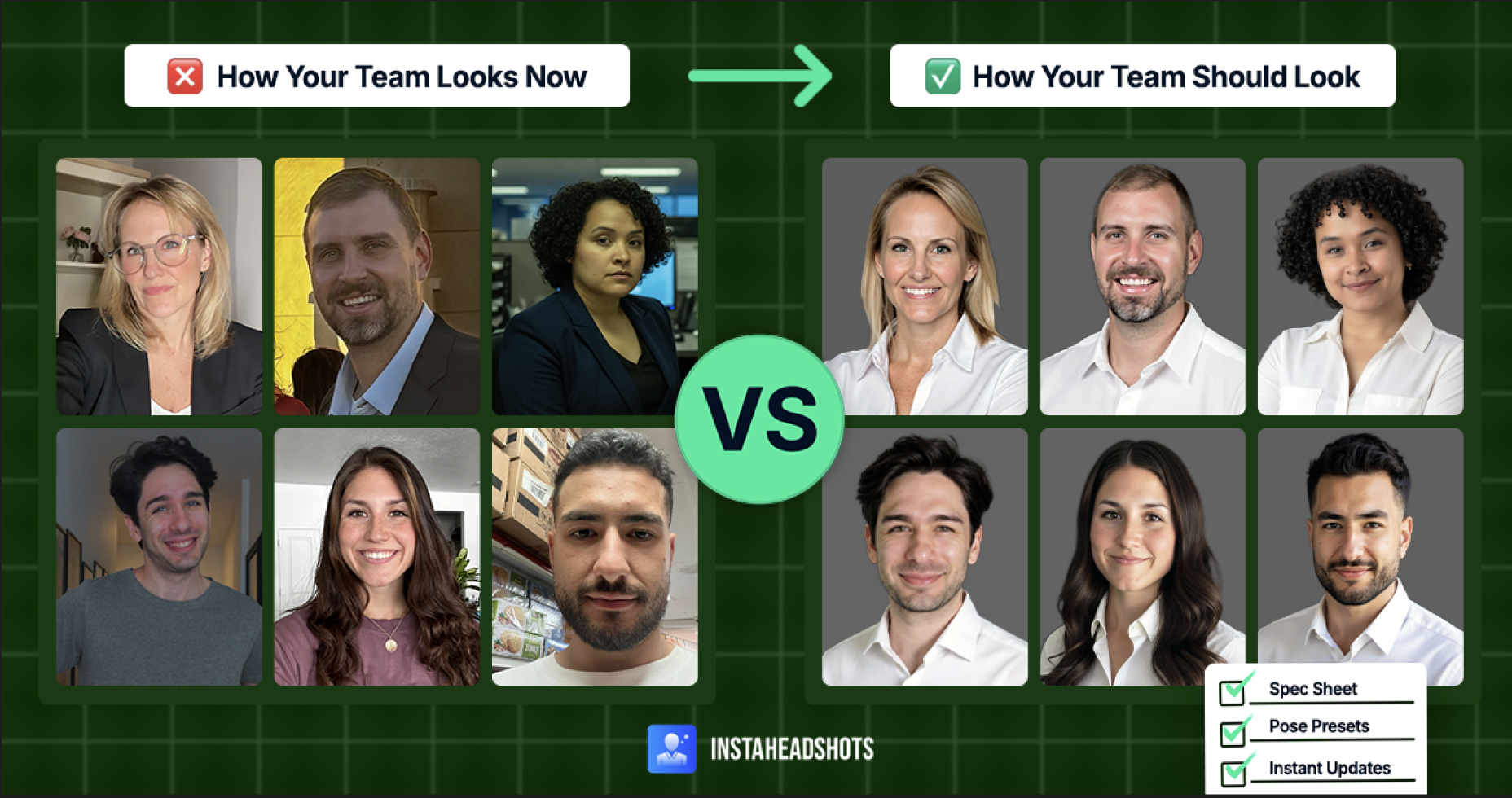
Why coordinating team headshots is harder than it looks—and how to fix it.
If you’ve ever attempted company-wide headshots, you know how quickly it unravels. Schedules clash. Lighting varies by location. Backgrounds don’t match. And just when you finish, new hires arrive and the process starts over.
Hiring a professional photographer isn’t always the fix. Businesses need consistent, polished photos that represent their entire team without disrupting work or draining budgets. Who presses the shutter matters less than the result.
Standardizing team headshots is where things break down. When photos span offices and hiring cycles, even well-planned shoots fall apart.
AI has become a practical way to solve that problem. You’ve probably seen AI portraits that look overly smooth or uncanny. InstaHeadshots takes a different approach, preserving natural skin tones, clean lighting, believable texture, and accurate clothing detail—so headshots look like real photos, without the coordination burden.
Ahead, we’ll break down why great headshots matter, how to prepare your team, and how to choose the right approach at scale.
TL;DR: Effective team headshots come from clear standards around style, preparation, and consistency, helping businesses maintain strong brand images as teams grow. Traditional photography and DIY setups can work, but often require more time and higher costs. Realistic AI tools like InstaHeadshots offer a more cost-effective way to update headshots and keep visuals aligned over time.
What team headshots are (and why they matter)
Team headshots, or corporate headshots, are professional portraits used across a company website, LinkedIn profiles, proposal decks, onboarding docs, email signatures, press kits, and other public-facing materials.
They shape first impressions almost instantly, often in digital spaces like LinkedIn, where professional profile photos can generate up to 21x more profile views. A strong image helps establish credibility before a conversation takes place.
That impact depends on alignment. A tightly cropped headshot next to a wider, shoulder-heavy portrait immediately looks mismatched. A busy or poorly chosen background distracts from the person. And an outdated photo makes someone feel unfamiliar to clients and prospects.
Timing differences also stand out. A headshot taken years earlier in a hallway looks out of place next to a recently shot portrait with brighter, more controlled lighting.
Great company headshots share a clear visual language. Consistent framing, balanced lighting, and coordinated backgrounds signal professionalism and attention to detail—without calling attention to the process behind them.
Key decisions to make before taking team headshots
Before you snap a single headshot, make a few foundational decisions that determine how cohesive the final set will be:
- Headshot usage: Define where these photos will appear—website bios, intranet profiles, presentations, badges, LinkedIn, and press releases.
- Style: Choose a look that reflects your company’s brand identity, such as classic corporate, modern minimal, warm and approachable, or bold and brand-forward. Apply it consistently.
- Framing: Decide on head-and-shoulders or 3/4 crop so every portrait follows the same visual structure.
- Expression: Set the tone with a shared expression, whether that’s a slight smile, a calm, neutral look, or a confident, grounded presence.
- Method: Determine whether you’ll use a headshot photographer, an in-office setup, or AI to generate realistic, on-brand headshots.
You don’t need everyone in the same room at the same time. Consistency (not timing) is what makes team headshots look professional.
How to prepare your team for headshots
To make the best impression, prepare your team with a few simple guidelines to help everyone feel comfortable in front of the camera:
- Encourage team members to test outfits in advance to avoid last-minute decisions.
- Keep grooming natural so people look like themselves at work (hair styled as usual, a haircut done a few days ahead, minimal makeup, regular facial hair).
- Review older shots to identify flattering angles and poses.
- Plan for shine reduction; light powder works for all genders.
- For DIY shoots, test lighting, backdrop, and camera setup ahead of time.
Preparation reduces stress, minimizes reshoots, and helps everyone feel comfortable on camera. The result is a set of great headshots that support your brand across every page, deck, and profile.
What to wear for team headshots
The right wardrobe keeps the focus on your people rather than distracting clothing details. Here are a few guidelines to help your team look their best:
- Stick to solid colors in mid-tones like navy, forest green, charcoal, or muted blue.
- Avoid neon colors, busy patterns, and clothing with large logos.
- Choose simple necklines that don’t distract or sit too close to the face.
- Recommend structured layers like blazers, jackets, or textured knits for a cohesive look.
- Dress for your industry: polished layers for finance or law, and business casual for startups or tech teams.
- Offer a simple outfit palette so employees can stay coordinated without dressing identically.
Fit and tailoring
Most people don’t realize that cameras amplify even small clothing issues.
Shirts should lie flat without gaping collars, sleeves should drape smoothly without bunching, and blazers should follow the natural shape of the shoulders.
It helps to try on outfits both sitting and standing. A collar that collapses when seated, shoulders that sag under a blazer, or a shirt that strains across the chest can look awkward on camera.
How to pose for team headshots
Use these tips to help everyone look natural and confident on camera:
- Keep shoulders relaxed with a slight forward lean.
- Gently extend the chin to reduce shadows.
- Aim for a warm, approachable expression rather than a forced smile.
- Angle the body slightly instead of facing the camera straight on.
If it helps, create a few simple pose presets for employees to follow. This keeps business headshots consistent and reduces guesswork during the shoot.
Keep in mind that crossed arms don’t always read as confident. For executives or consultants, they can signal authority. For customer-facing teams, they often appear stiff or unapproachable.
The best backgrounds for team headshots
Choosing the right backdrop sets the tone for your headshots, centers attention on your team, and reinforces a cohesive, branded look. Here’s what works best and why:
- Light gray, soft white, or charcoal: Keep the focus on the person and create a timeless, professional look.
- Soft color backgrounds: Add personality for tech or creative teams—especially when they align with brand colors—without distracting from the subject.
- Environmental backgrounds: Create visual context when the setting is uncluttered and evenly lit.
Subtle variations in backgrounds are fine as long as lighting, cropping, and framing stay consistent. This flexibility helps teams maintain a professional look without forcing uniformity.
How to take your own team headshots (DIY workflow)
With the right process, you can capture professional-looking images without leaving the office. Follow these steps to keep the workflow smooth and repeatable:
- Set up an uncluttered backdrop and mark a fixed standing position for consistent framing.
- Mount the camera at eye level to keep the composition uniform across shots.
- Position team members near a large window or under diffused lighting for even, flattering results.
- Capture a few variations so employees can choose the image that feels most natural.
- Take a reference shot first and use it to match framing, angles, and lighting for every photo.
Team headshot costs: Photographers vs. AI
Traditional headshot photography can deliver professional results, but it often comes with higher upfront and ongoing costs.
Photographer fees may range from $100–$250 per hour or $300–$3,000 per day, with additional charges for per-image retouching, licensing restrictions, travel or setup, and reshoots or extra headshot sessions for new hires. In-person sessions also pull employees away from work, adding indirect costs in time and productivity.
AI-generated headshots offer a more scalable alternative without sacrificing quality. With InstaHeadshots, teams get fast, realistic images with consistent framing, lighting, and style—while preserving employees’ natural appearance and avoiding recurring photo-day costs. There are also no licensing limitations, making it easier to reuse headshots across platforms.
How to keep team headshots consistent over time
Once you have a full set of professional team headshots, the real challenge is maintaining alignment as time passes. New hires join, teams evolve, and appearances change. Your headshots should keep pace.
Start by creating a simple visual spec sheet or style guide for future photos. Document key details such as cropping, lighting, background color, and preferred poses so new images match the existing set.
Some teams plan annual refreshes to stay current, but recurring photoshoots aren’t the only option. You don’t need everyone on-site to maintain consistency.
AI tools like InstaHeadshots make it simple to update headshots as teams grow. By generating images that match your existing style and visual standards, new hires can be onboarded with professional photos right away.
Once headshots are approved, store them in a central library so marketing, HR, and leadership teams can access the latest versions when needed.
Aligned headshots make your team look unified and credible
Cohesive team headshots do more than look refined. They build trust and create visual consistency across the places your business shows up most—websites, sales materials, directories, and LinkedIn—helping your company appear organized, credible, and intentional. When every portrait follows the same standards, your team presents as a unified whole rather than a collection of individual photos.
There’s no single right way to get there. Traditional photography, well-planned DIY setups, and high-realism AI all offer viable paths to consistency, depending on how your team works and grows. InstaHeadshots supports businesses that need high-quality, reliable results without repeated photo days, delivering natural-looking headshots that stay aligned as roles change and new hires come on board.
Create professional headshots in minutes—without the cost of a studio session. Get started with InstaHeadshots today.
FAQs
What should our team wear for headshots?Stick to clean, solid mid-tone colors that create contrast without overpowering the face. Structured layers like blazers, jackets, or textured sweaters help create a cohesive look across departments.
What background works best for team photos?Neutral tones such as light gray, soft white, or charcoal keep attention on the person and maintain uniformity across platforms and screen sizes.
Do we need a professional photographer for team headshots?Not necessarily. Photography is one option, but realistic AI tools can now replicate studio-quality lighting, texture, and detail—without scheduling conflicts or costly touch-ups.
How often should we update team headshots?Plan for annual updates, or sooner if your team grows quickly. AI makes it easy to onboard new hires with headshots that match your existing style.
Can we take our own team headshots in the office?Yes. With diffused natural light, a clean backdrop, a tripod, and consistent positioning, DIY headshots can look polished. AI can further help align lighting, framing, and realism for final images.