What Is MyERAS and How to Log In: The Real Reason Applicants Get Stuck
MyERAS is the applicant portal of ERAS. Learn what it is, how to log in, and the four-step sequence first-time residency applicants and IMGs keep missing.

I kept seeing the same panic in residency forums. "I can't log into MyERAS." Same message, different applicant, every single season.
When I dug into it, the login screen was almost never the actual problem. The problem was upstream. People were missing steps they didn't know existed, then blaming the sign-in page. Most growth problems are structural, and honestly, so is this one.
If you're a med student or an IMG applying for U.S. residency for the first time, you're juggling deadlines, fees, and three different portals that look similar but do very different things. One wrong assumption can cost you days.
Here's the correct mental map, the exact login sequence, and the errors that trip people up, so you never hit that "I can't log in" wall.
What Is MyERAS? A 30-Second Answer
MyERAS is the applicant-facing portal of the Electronic Residency Application Service (ERAS), a service run by the AAMC. In plain terms: MyERAS is where you build and submit your residency application.
But MyERAS is only half of ERAS. It is not the Match.
Here's the distinction that clears up most confusion:
- ERAS transmits your application and documents to programs.
- MyERAS is the applicant side of ERAS where you do the work.
- NRMP runs the actual Match through a separate system called R3.
The NRMP is blunt about it: "NRMP and ERAS are different organizations and systems in the matching process with very different functions, but you may need to use both services to match." I'd frame it even simpler. MyERAS transmits you to programs. NRMP places you into programs. You need both.
| System | What it does | Who owns it |
|---|---|---|
| AAMC account | Your identity across all AAMC products | AAMC |
| ERAS | Sends your application to programs | AAMC |
| MyERAS | Where you build and submit the application | AAMC |
| NRMP R3 | Ranks applicants and runs the Match | NRMP (separate) |
Registering on ERAS does not register you for the Match. The AAMC FAQ states it plainly: "registering with the ERAS system does not register you for the National Resident Matching Program (NRMP) or any other matching service."
Remember that sentence. It destroys the most common assumption I see: "I applied, so I'm in the Match." You're not.
Why the Login Problem Is Really an Ecosystem Problem
Here's the conventional wisdom I want to challenge: people think MyERAS is just a login page. Make an account, click sign in, start applying like any other website.
That mental model is wrong, and it's why applicants panic.
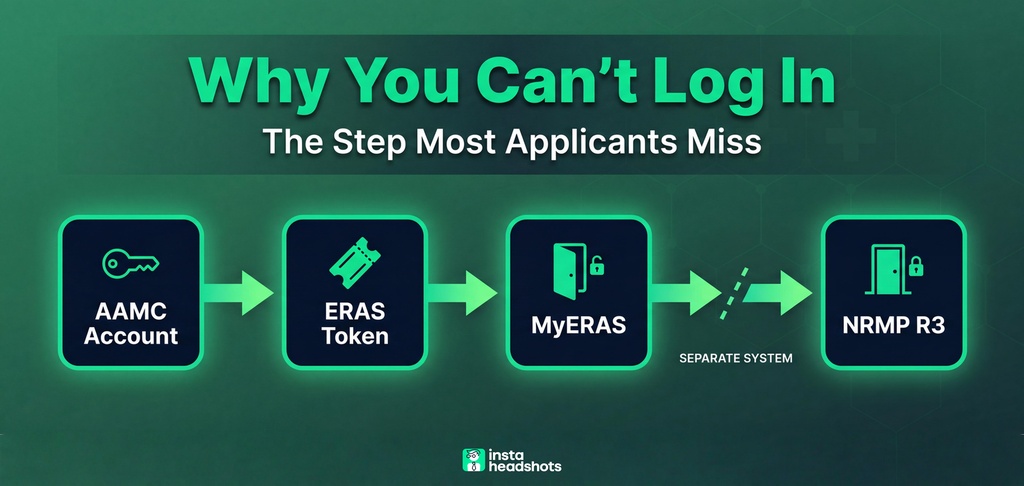
MyERAS login is the last step of a four-institution chain, not the first. To reach the portal, you need an AAMC account, then a season-specific token from your dean's office (or ECFMG if you're an IMG), then a one-time registration. Skip any step and you get a different error.
Constraints create clarity here. Once you see the sequence, the panic disappears. So let me lay it out.
The Four-Step Login Sequence, In Order
Every successful MyERAS login is the end of this chain. Order matters.
Step 1: AAMC account (your identity). If you've used AMCAS or registered for the MCAT, you already have one. Do not make a new one. If not, create it at the AAMC sign-in page.
Step 2: ERAS token (your season pass). A token is a one-time access code used to register on MyERAS. U.S. MD/DO applicants get it from their Designated Dean's Office. IMGs get it from ECFMG.
Step 3: MyERAS registration (unlock the door). This is the one-time act of turning your token plus AAMC account into a working applicant record. You visit the portal, sign in, enter the token, and complete a few forms.
Step 4: NRMP registration (the separate Match door). Later in the season, you register at r3.nrmp.org for the Match. Different site, different date, different fee.
The registration flow inside MyERAS is documented by the AAMC. The login URL is https://myeras.aamc.org/myeras-web/. Here's the exact sequence:
- Visit the MyERAS portal.
- Sign in with your AAMC account (or create one).
- Enter a valid ERAS token and select Continue.
- Accept the terms and conditions.
- Complete your Medical School Graduation Information and accept the AAMC Policy Notice.
- Review and continue.
- If prompted, import materials from a previous season.
Tokens are season-specific and single-use. The system will not let you use a token from a previous season. You need a fresh one every cycle.

How U.S. MD and DO Applicants Get Their Token
For U.S. grads, the actor is your Designated Dean's Office. It's the only entity that can issue your token, and only your own school's office can generate one that works.
Each office sets its own distribution process. Some email the token. Some make you pick it up. Some use a request form. The practical move: ask your student affairs office early exactly how they distribute tokens.
DO applicants follow the same path. The AOA confirms it: "Contact your designated dean's office for your token. Only your own designated dean's office can generate a token that you can use."
One worked example: Ohio University's osteopathic college directs candidates to email a specific match address to request their token. Your school likely publishes similar instructions on its student affairs page. Find it now, not in September.
U.S. MD/DO applicants pay nothing for the token itself. The dean's office is reimbursed by AAMC for processing.
How IMGs Get Their Token: The ECFMG and MyIntealth Path
IMGs take a longer road, and it costs money. This is where the ecosystem gets real.
The path starts with MyIntealth, the ECFMG portal that replaced the old OASIS system. Per ECFMG, the sequence is:
- Create a MyIntealth account with your info, medical education details, a photo, and a scanned passport.
- Complete identity verification. Standard processing is about 3 business days.
- Log in and go to Services, then ERAS Support Services, then the Request ERAS Token tab.
- Pay the $185 non-refundable fee.
- Retrieve your token when ECFMG processes it.
- Take the token to MyERAS and complete registration.
That $185 fee is non-refundable. Verify your specialty actually uses ERAS before you pay it.
One guide from IMGPrep puts the strategy well: "The ten weeks between Token release and the September 2 application opening are the most strategically important of your cycle." IMGs who treat the token as a finish line waste that runway.
Common IMG Token Mistakes
- Waiting until August to request. Tokens depend on verification time, not instant delivery.
- Requesting before identity verification is complete.
- Buying a token for the wrong cycle.
- Buying a token when your specialty doesn't even use ERAS.
- Treating the token as the end. Application content, signals, and LoRs still follow.
The 2027 Cycle Timeline You Should Anchor To
Don't work off vague phrases like "early June." Use dates. Here are the anchor dates for the 2027 cycle, per the AAMC timeline.
| Date (ET) | Event |
|---|---|
| May 31, 2026 | 2026 season ends |
| June 4, 2026 | 2027 season opens; U.S. schools can issue tokens |
| June 24, 2026 | ECFMG begins issuing 2027 tokens to IMGs |
| Sept. 2, 2026 | MyERAS submission to programs opens |
| Sept. 23, 2026 | Programs begin reviewing in PDWS |
| May 31, 2027 | 2027 season ends |
Notice the 20-day head start U.S. schools get over IMGs. Notice also the long gap between token release and the September submission date. That gap is your prep window. Use it to finish every section, not to wait.
For a fuller map of prep deadlines and how they line up with the Match, I put together a separate MyERAS timeline guide that backward-plans the whole cycle.
What MyERAS Actually Does After You Log In
Once you're in, three things surprise first-timers.
One application, many programs. You have one application that goes to every program you apply to. You don't rewrite it per program. Customization happens by assigning specific Personal Statements and Letters of Recommendation to specific programs.
No spell-check. The MyERAS application has no spell or grammar check. Proofread offline. This is a small detail that quietly sinks applications.
Program signals are a separate behavior. Since the 2025 cycle, you can send a limited number of signals per specialty to express interest. Internal Medicine, for example, uses a tiered system of 3 Gold and 12 Silver signals. Signaling happens inside MyERAS and is independent of applying.
One early task after login is uploading your photo. It's used to identify you at interviews, and the technical spec matters more than the outfit. If you want the exact dimensions and file size, I broke it all down in the ERAS photo guide.
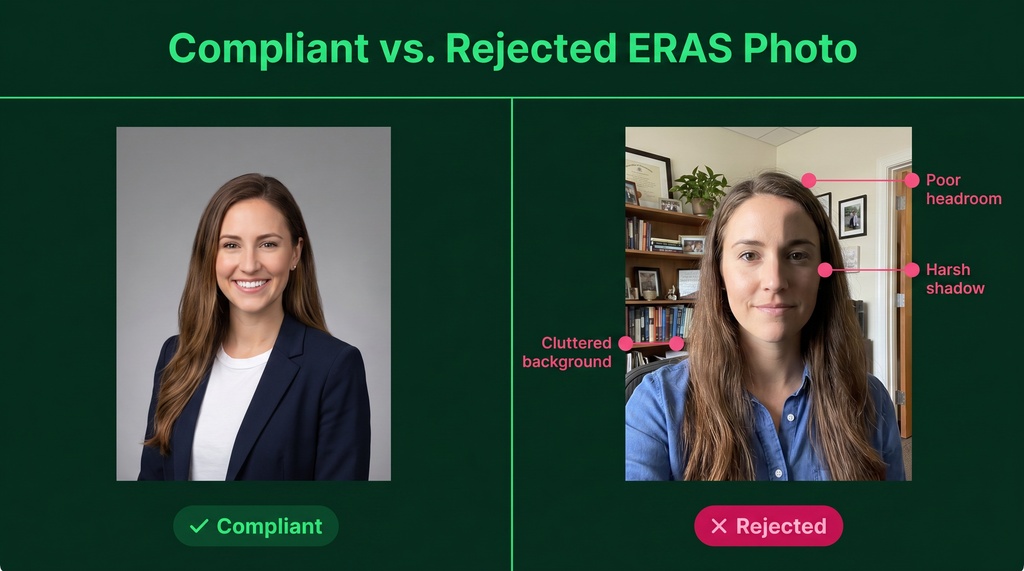
On the photo: you don't need an expensive photographer to be compliant, you need the right spec. AI headshot tools like InstaHeadshots can produce a professional, spec-ready photo from selfies in minutes for $49 to $69, versus $150 to $500 for a traditional session. For most applicants that's a fine option, though some may still prefer a studio shot. Either way, the spec is what the portal cares about. Before you upload, our free ERAS Photo Checker confirms your file meets that spec.
The Fees, and the Discount People Miss
The fee structure that began with the 2025 season still applies today, per the AAMC fees page.
| Applications submitted | Per-application fee |
|---|---|
| 1 to 30 | $11 |
| 31 or more | $30 |
The breakpoint at 30 is the lever. The first 30 applications are cheap. Everything after gets nearly triple.
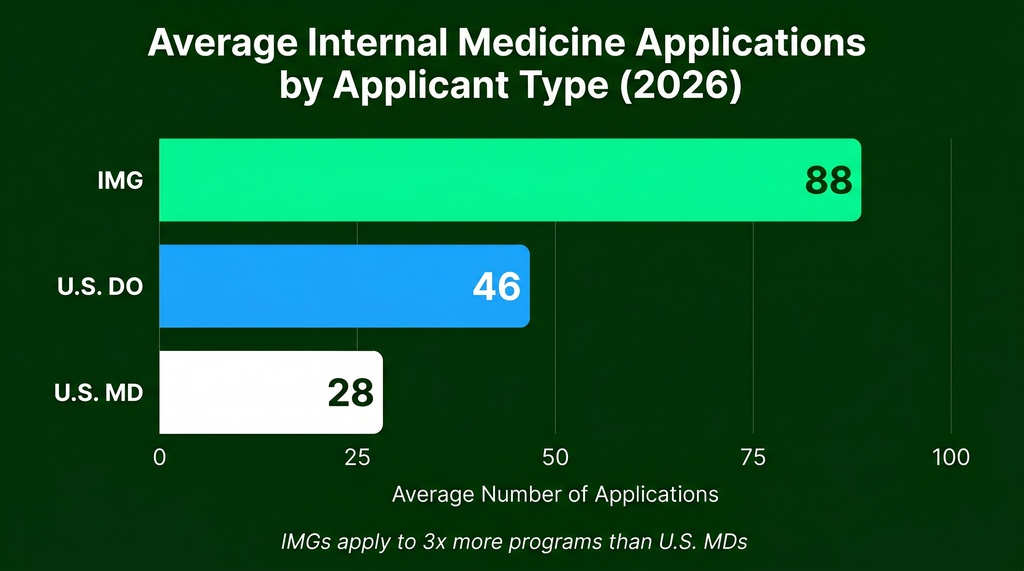
This matters because Med School Coach reports the average applicant now files 81.8 applications, and IMGs in Internal Medicine average 88 versus 28 for U.S. MDs. That's a big fee bill.
One discount is worth chasing. If you were approved for the AAMC Fee Assistance Program during med school admission, you get a 60% discount on up to 50 ERAS applications. But there's a gotcha. The AAMC warns: "Do not create a new AAMC account. Using a different ID may prevent your benefit from appearing."
Use the same AAMC ID tied to your original approval. This is the single most common reason the discount silently fails to apply.
Common Login Errors and Their Exact Fixes
Most "I can't log in" tickets have simple fixes. Here are the ones the AAMC documents.
| Symptom | Fix |
|---|---|
| Locked account | Reset your password to unlock it |
| Forgot username | Use "Forgot your username?" on the sign-in page |
| Copy-paste password fails | An extra space sneaks in. Type the password manually |
| Page errors after maintenance | Clear browser cache or open in a new browser |
| Multiple tabs open | Don't. Multiple tabs cause errors in MyERAS |
| Mac browser issues | Use Firefox or Chrome |
| Token from another school | Won't work. Tokens are school-matched |
| Last-cycle token | Won't work. Tokens are annual |
If nothing works, the AAMC Support Center runs Monday to Friday, 8 a.m. to 6 p.m. ET.
When the Ecosystem Breaks: The April 2025 ECFMG Outage
Here's proof that the login problem lives upstream. In April 2025, ECFMG took down OASIS for ERAS token requests. IMGs could no longer use it.
ECFMG's announcement told applicants to call a support line if a program requested an application and they had no token. The workflow had moved to MyIntealth.
Think about what happened. A portal change at ECFMG, not at MyERAS, blocked MyERAS access for IMGs. MyERAS itself was fine.
The buck stops with you here, and the lesson is clear: MyERAS reliability depends on three independent systems (AAMC, ECFMG, and NRMP). When you can't log in, ask which gate failed before you stare at the sign-in screen.
The Mental Map to Keep
If you remember one thing, remember this sequence:
- AAMC account = your identity. Don't make a second one.
- ERAS token = your season pass. Free for U.S. grads, $185 for IMGs, new every cycle.
- MyERAS = the unlocked door where you build and submit.
- NRMP R3 = a separate door for the actual Match, on a separate date.
Each step has its own gatekeeper and its own failure mode. An applicant who holds this map won't panic at any error, because they'll know exactly which step it lives in.
Execution is a strategy. Get the sequence right, start early, and the login screen becomes the easy part.