
Can You Retake or Update Your ERAS Photo? Yes, and Here's How
Worried your ERAS photo is locked in? You can retake, replace, and re-upload it. Here's exactly how the process works and what to do if it's rejected.

I've hired and interviewed thousands of people. I've also watched smart people burn hours of energy on the wrong problem. The ERAS photo is a classic case.
Applicants treat it like a one-shot bet. Upload the wrong file and you've supposedly damaged your whole application. That belief is wrong, and it costs people sleep during the exact weeks they need to focus.
Here is what I found after digging into the official AAMC rules and real applicant reports: the photo is one of the most fixable parts of the entire application. You can retake it. You can replace it. You can re-upload it after you certify and submit. A rejection is routine, not a crisis.
Let me walk you through exactly how and when you can update your ERAS photo, so you can stop worrying and get back to the parts that actually move the needle.
The Short Answer: Yes, You Can Update Your ERAS Photo
Yes. You can retake, replace, and re-upload your ERAS photo at any time before you apply to a program. The new file overrides the old one.
The official AAMC Photo chapter confirms you select "Upload New Photo" in the Actions column on the Additional Documents page. Do it as many times as you need.
Here is the key point most applicants miss. The photo lives in a separate lane from your application body.
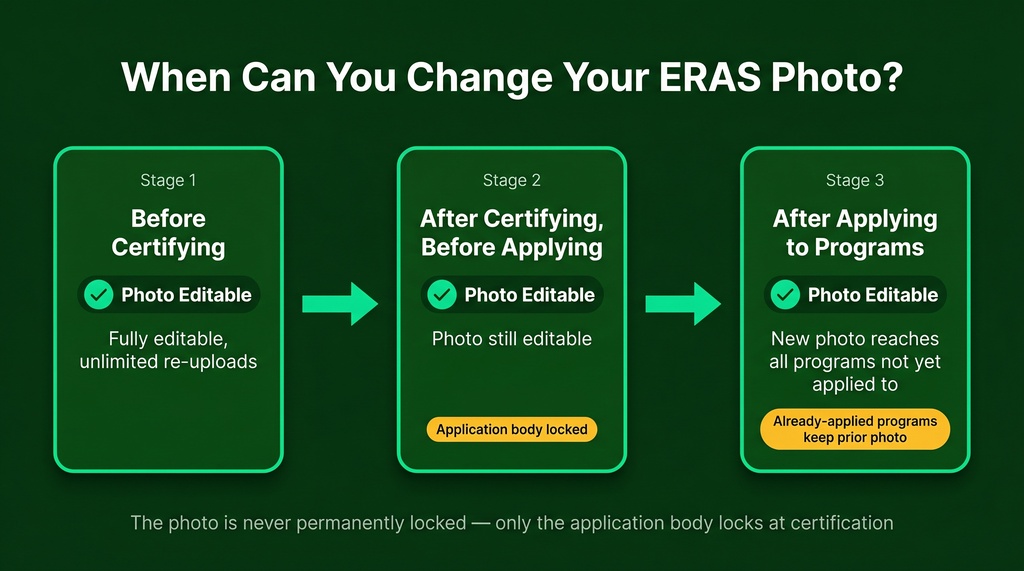
- Before certifying: Re-upload freely, as often as you want.
- After certifying, before applying: The application body locks, but the photo does not. It sits under Additional Documents.
- After applying to programs: You can still upload a new photo. Programs that already downloaded your file keep the old one. Every program you have not yet applied to gets the new one.
That's the whole story. The lock applies to your experiences, education, and personal statement. It does not apply to the photo.
Complex problems usually have simple governing variables. Here, the governing variable is timing. The sooner you fix a bad photo, the more programs receive the good one.
What the Photo Actually Needs to Look Like
Before you re-upload, get the spec right. This is where most photos quietly fail, and it has nothing to do with how good you look.
The AAMC publishes a narrow set of hard numbers. The MyERAS portal enforces them. Miss one and the upload fails or the image shows up distorted to programs.
| Specification | Requirement |
|---|---|
| Print dimensions | 2.5 in. x 3.5 in. (portrait) |
| Pixel dimensions | 375 x 525 pixels minimum (at 150 dpi) |
| Resolution | 150 dpi minimum |
| File format | JPG/JPEG or PNG |
| Max file size | 150 KB |
| Composition | Head and shoulders, neutral background, face centered |
The AAMC Photo chapter states the file must be JPG/JPEG or PNG with a 150 KB maximum. If you've seen a 100 KB cap somewhere, that number is outdated. It came from the old ECFMG upload pipeline, as I cover in our ERAS photo specs breakdown.
One thing worth naming: distortion is more dangerous than an outright rejection. A rejected upload tells you something is wrong. A distorted one leaves you thinking you have a photo while programs see something unrecognizable.
So verify the file before you upload. Check the dimensions in your image properties. Do not trust how it looks in your local viewer. Our free ERAS Photo Checker confirms your file is compliant in seconds.
Why Photos Get Rejected (and Why It's Not a Crisis)
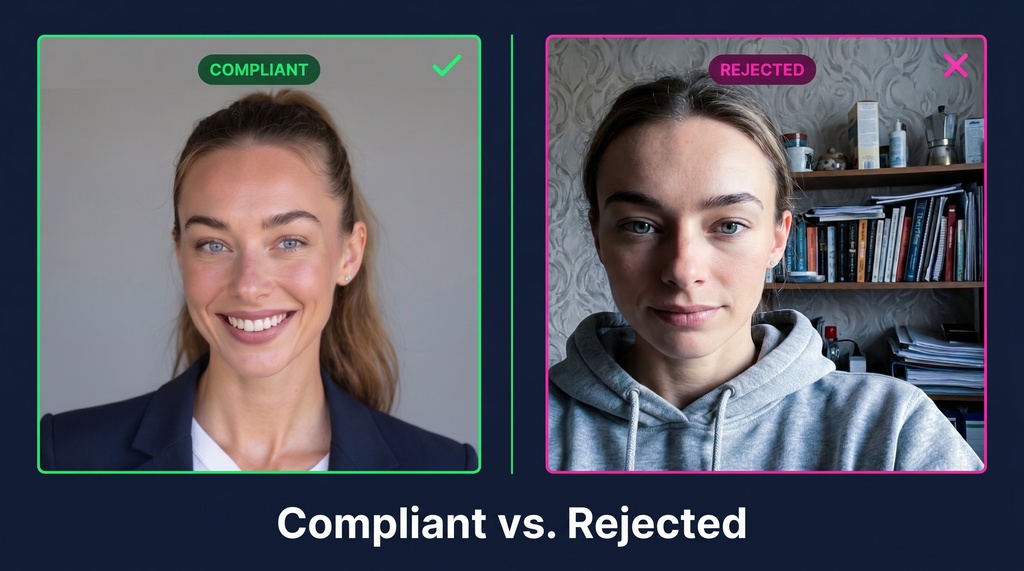
A rejection feels like a verdict. It isn't. It's almost always a boring technical mismatch you can fix in minutes.
Here are the failure modes I found across applicant guides, ranked by how common they are:
| Reason | The Fix |
|---|---|
| File over 150 KB | Re-export as JPEG at spec, keep it under 150 KB |
| Wrong aspect ratio | Match 2.5 x 3.5 portrait, do not use social crops |
| Blurry after manual resize | Use a photographer or export at exact spec |
| Casual attire or scrubs | Wear business attire, skip the white coat |
| Photo not assigned | Assign it under the Additional Documents tab |
Notice the pattern. Most fixes are a re-export, not a full reshoot. As our specs guide puts it, most "photo problems" have nothing to do with quality.
Here is the counterintuitive part. The single most common ERAS photo error isn't rejection at all. It's forgetting to assign the photo.
IMGPrep flags unassigned photos as one of the two most frequent avoidable errors. A perfectly formatted photo shows nothing to reviewers if you never assign it. The problem is omission, not evaluation.
On the attire question, there's no official AAMC dress code. The suit rule came from photographers and career offices, not AAMC. If you're reshooting, treat wardrobe as a style choice.
Don't confuse motion with progress. Reading the spec once and checking the assign box beats endless worrying about whether your smile is right.
How Fast Does a Replacement Photo Go Live?
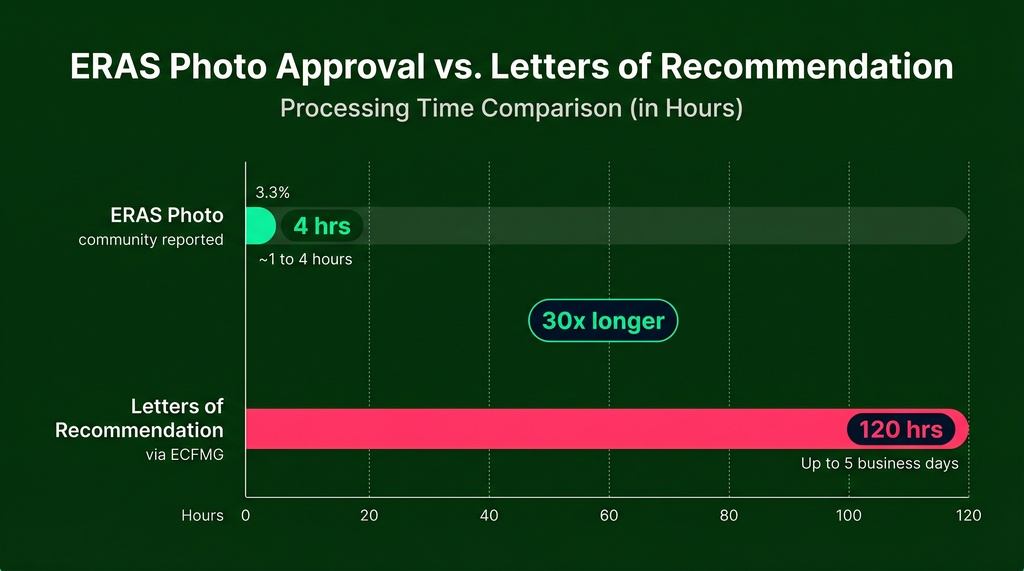
This is where ERAS photo timing breaks from letters of recommendation. Letters can take up to five business days. The photo does not work that way.
AAMC doesn't publish a guaranteed turnaround. But applicant reports point to fast, near-automated processing.
On IMGreddit, users reported approval times of 1 to 4 hours, not multi-day queues. One wrote it "was processed in like 1 hour." The dashboard shows a simple "Uploaded" status with no separate "In Review" step, which suggests automated spec validation.
The practical takeaway differs by applicant type:
- US graduates (MD/DO): The realistic deadline is the day before you apply. The photo uploads to your account instantly.
- IMGs: Build in a buffer. Your file routes through MyIntealth, gets verified by ECFMG, then transfers to ERAS. IMGPrep recommends taking your photo four to six weeks before ERAS opens for this reason.
One rule for everyone: treat the upload as asynchronous. Confirm the "Uploaded" status. Don't apply to programs within an hour of uploading if you want certainty.
Speed matters, but direction matters more. The bottleneck is creating a compliant file, not waiting for approval.
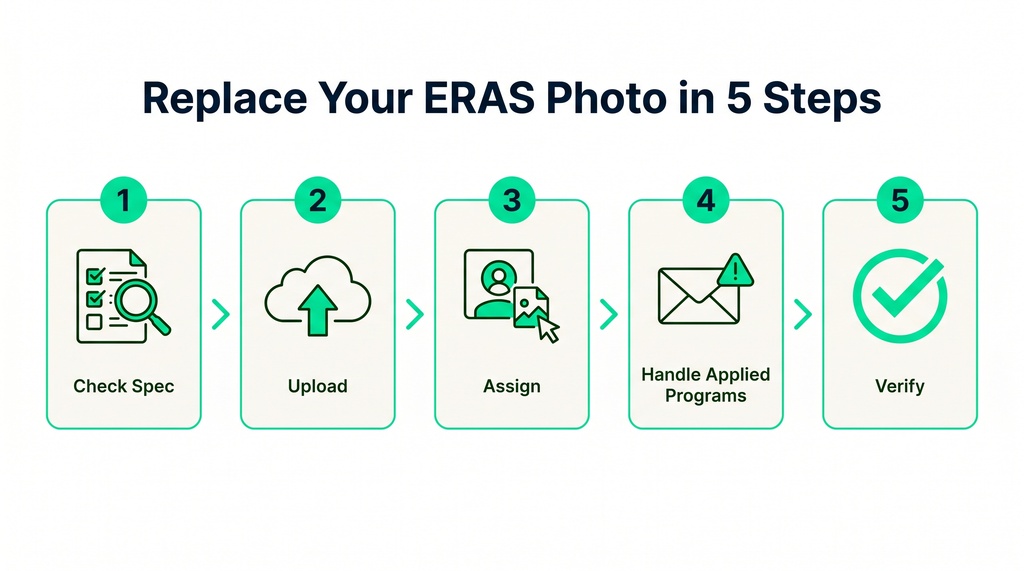
The 5-Step Replacement Workflow
When you notice a problem, act. Here's the exact sequence I'd follow, built from AAMC guidance and real applicant reports.
- Confirm the file meets spec. JPEG, 2.5 x 3.5 in, 150 dpi, under 150 KB. Check dimensions in properties before uploading.
- Upload in MyERAS. Go to Additional Documents, then Photos, then "Upload New Photo" in the Actions column. The old file gets overwritten.
- Assign to all Saved Programs. Select the photo and click Assign. Every program you haven't applied to yet receives the new image.
- Handle already-applied programs. You can't unassign a photo from a program you've applied to. You can only upload a new one and assign it forward. Those programs keep the old file.
- Verify. Check the dashboard status and the profile picture in the top-right corner. IMGs should confirm the file is verified in MyIntealth first.
This really works after submission. On Student Doctor Network, an applicant panicked that their submitted photo was the wrong size. Another user replied that they'd reuploaded a photo the same day for the same reason, after already submitting, and confirmed the new photo showed up. One even called AAMC support to verify.
That's the panic this article exists to fix. It's real, it's common, and it has a clean answer.
Cost of a Reshoot: Studio, AI, or DIY
Sometimes the file is compliant but you just want a better photo. Here the real question is cost and speed. I compared the options.
| Option | 2026 Price | Turnaround | Compliance Risk |
|---|---|---|---|
| Studio photographer | $150 to $325 | Same-day to 3 days | Lowest |
| Reddit low-end pro | ~$120 | Same-day to a few days | Low |
| AI headshot services | $25 to $75 | Under 2 hours | Medium (verify file) |
| DIY smartphone + resizer | $0 | Same-day | High |
Studio pricing ranges from $150 at some studios up to $325 at higher-end options. That's the safest bet if authenticity or specialty culture matters most to you.
If speed is the priority, AI is the cheapest defensible path. AI headshot services now target residency applicants directly and can produce a compliant file in a couple of hours. A tool like InstaHeadshots starts at $49 and delivers dozens of headshots in as little as 15 minutes, versus roughly $300 and half a day at a studio. Its ERAS headshots tool builds a compliant, ERAS-ready headshot from just 10 random selfies.
One honest caveat. A 2026 photographer guide notes that some program directors have started comparing ERAS photos to who shows up for interviews, and flag major mismatches. Their words: "they want to see a real person. Not a glamour shot, not a passport photo."
So be conservative on heavy AI stylization, especially for your top programs. The safest AI approach is a clean, natural result that still looks like you on interview day.
Where the Photo Really Ranks in Your Application
Let me put this in perspective, because perspective is what kills the anxiety.
The photo does not clear your USMLE scores past a threshold. It does not decide your visa eligibility. IMGPrep frames it as a Stage 3 qualitative filter, where it can introduce a small negative signal only if it's formatted poorly.
The research backs the low-stakes framing. A 2026 JMIR Medical Education study of 2,681 applications found that any link between "attractiveness" and interview odds vanished once researchers controlled for scores, experience, and demographics. As I discuss in our ERAS photo guide, the photo's job is to be compliant, unambiguous, and recognizably you. Nothing more.
In markets and careers, survival is underrated. The ERAS photo is not where applications die. It's the easiest thing on your list to fix in the moment it goes wrong.
The Quick Decision Tree
Just uploaded the wrong photo? Convert the anxiety into action:
- Applied to any programs already? Those keep the old download. Everyone else gets the new photo the moment you assign it.
- Inside MyERAS now? Additional Documents, Photos, Upload New Photo. Replace with a compliant JPEG.
- Forgot to assign? A perfect upload shows nothing unless assigned. Assign it to every Saved Program.
- IMG seeing issues in MyIntealth? Contact ECFMG directly. They diagnose verification-stage rejections the MyERAS portal never sees.
- Still stuck? Call AAMC ERAS Applicant Support at 202-862-6264 (M-F, 8am to 6pm ET).
The Bottom Line
You walked in believing two things: that the photo locks after upload, and that a rejection puts your application at risk. Both are wrong.
The photo re-uploads freely before certification, stays editable after you certify, and reaches every not-yet-applied program even after submission. A rejection is a fast re-export, not a setback. Approval runs in hours, not days.
Patterns repeat, and most people just don't notice them. The pattern here is simple: the ERAS photo is more forgiving than a personal statement, faster than a letter, and cheaper than a USMLE retake.
Treat the spec as a checklist. Leave a buffer if you're an IMG. Assign to every Saved Program after every upload. That's the entire playbook. Now go spend your energy on the parts that actually matter.